
Stable Audio 3, explained in 5 figures
A walkthrough of how it works, what it can do, and why it runs on your laptop.

Stable Audio 3 is a new family of AI models that generate instrumental music and sound effects from a text prompt.
It’s fast (minutes of audio generated in under 2 seconds on a GPU), allows edits (regenerate just a portion of a clip), and legally clean (trained only on licensed and Creative Commons data).
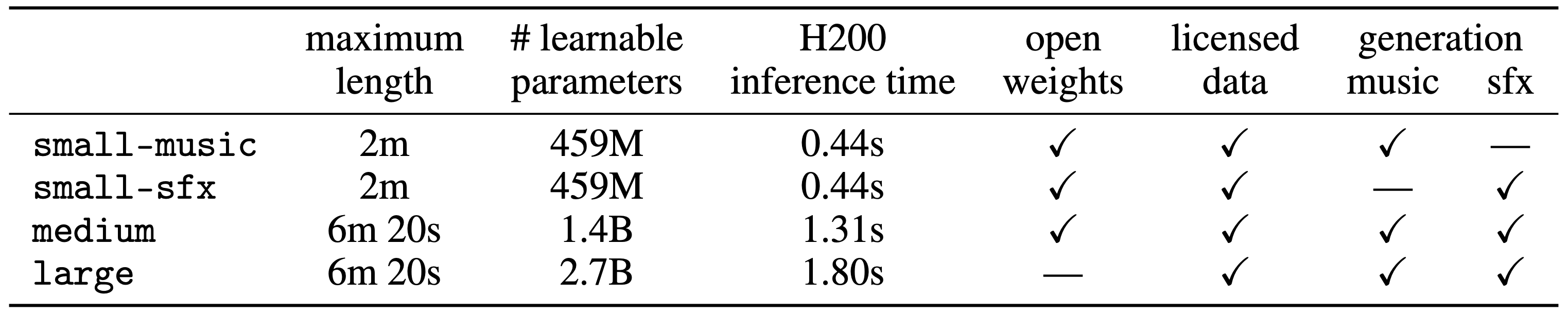
Two of the three model sizes (small and medium) are open weights and run on consumer GPUs. small even runs on a MacBook Pro M4.
It achieves state-of-the-art results on instrumental music and sound effects benchmarks, beating every open weights competitor.
How it works?

The model takes three inputs: a text prompt (“a jazz piano solo”), the duration in seconds, and optional editing controls. With that, it generates stereo audio at 44.1 kHz.
Three model sizes ship: small (459M parameters, up to 2 minutes), medium (1.4B, up to 6m 20s), and large (2.7B, also 6m 20s). The first two are open weights.
Efficiency unlock: variable-length
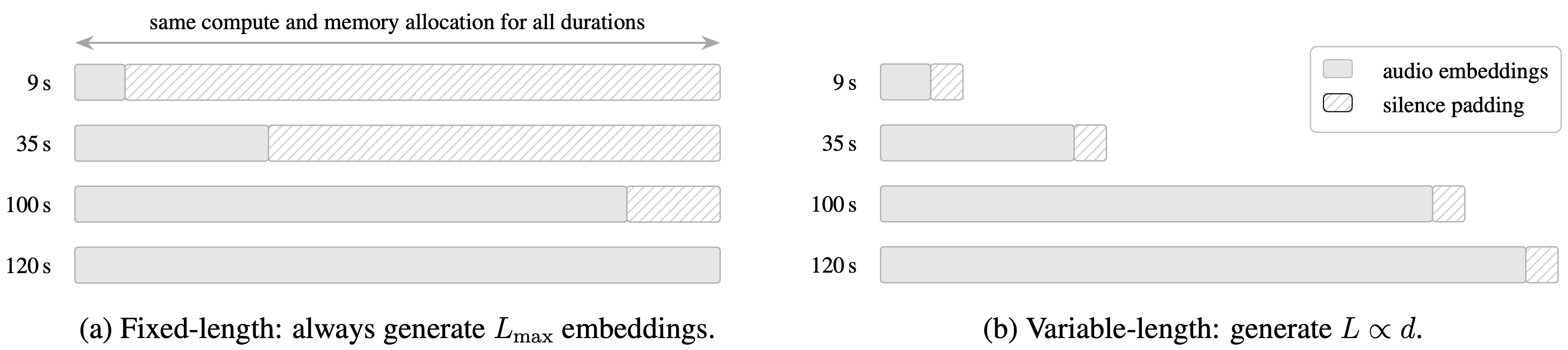
Here’s the way most diffusion audio models work: pick a maximum length (say 120s), and every single generation runs at that length. Even if the user only wants 5 seconds. The remaining 115 seconds get padded with silence. You pay full compute cost for a short clip.
Stable Audio 3 addresses this challenge. Ask for 9 seconds, the model generates 9 seconds of compute. Ask for 100, you get 100. Compute scales with what the user actually needs.
It’s not just a generator, it’s an editor
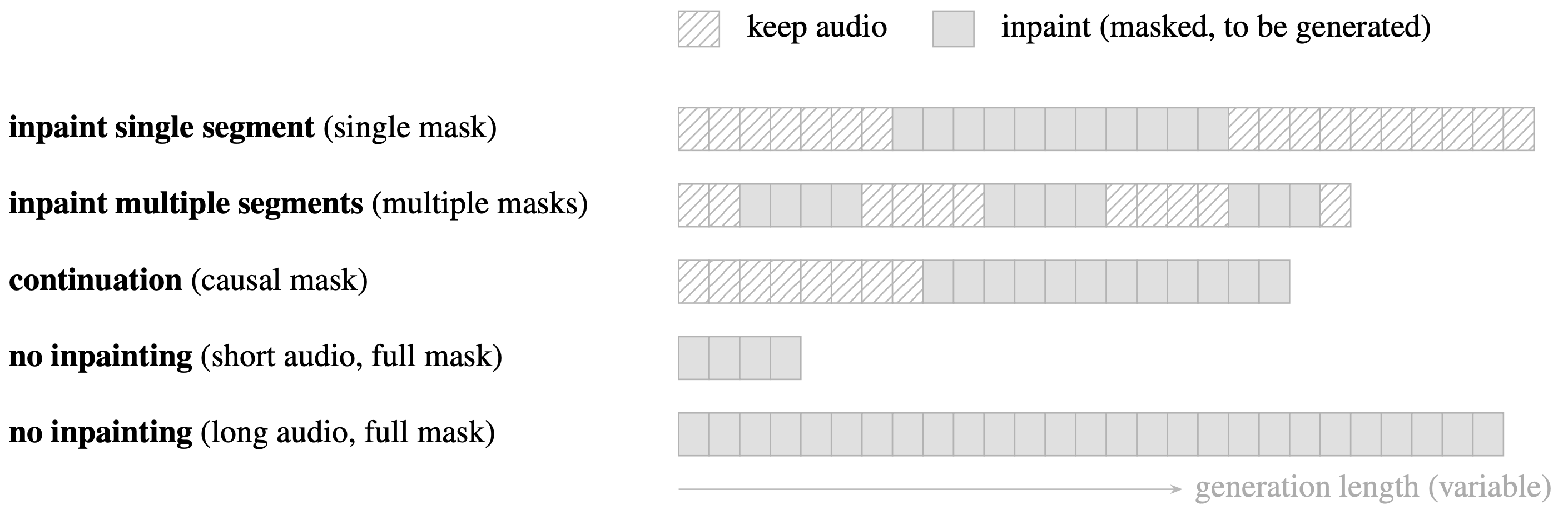
Most creators don’t need one-shot generators. They want to iterate. For this reason, Stable Audio 3 supports audio editing via inpainting.
You hand it an audio clip plus a mask saying “regenerate this part”, and the model fills in the masked region while keeping everything else intact. They support three modes:
Single segment: re-roll one part of a track (a transition, a transient, one weird cymbal hit).
Multi-segment: edit multiple sections at once.
Continuation: feed in 5 seconds, let the model extend it.
One-shot generation is cool, but editing is what lets artists finish a piece of work.
Three-stage training
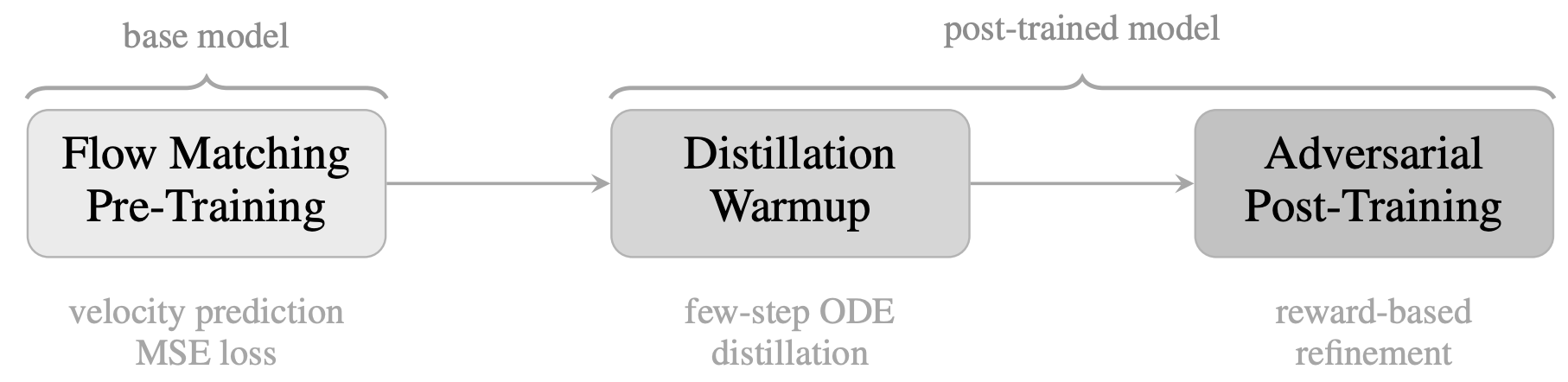
Flow matching pre-training (the base model). It learns to turn noise into audio over many small steps. Problem: it’s slow at inference, as it requires 50 to 100 steps per generation.
Distillation warmup. Train the model to do one step generation, instead. Faster, but outputs are not (yet) good.
Adversarial post-training. Bring in a second model (a discriminator) that rates how realistic the audio sounds, and fine-tune the generator to fool it. This recovers the sharpness that distillation smoothed away, without going back to multi-step inference.
The result: te resulting adversarially post-trained model can generate audio in a single pass. Yet, one step generations remain challenging.
Stable Audio 3 uses 8 inference steps while producing better outputs than the 50-step base model.
How 8 inference steps?
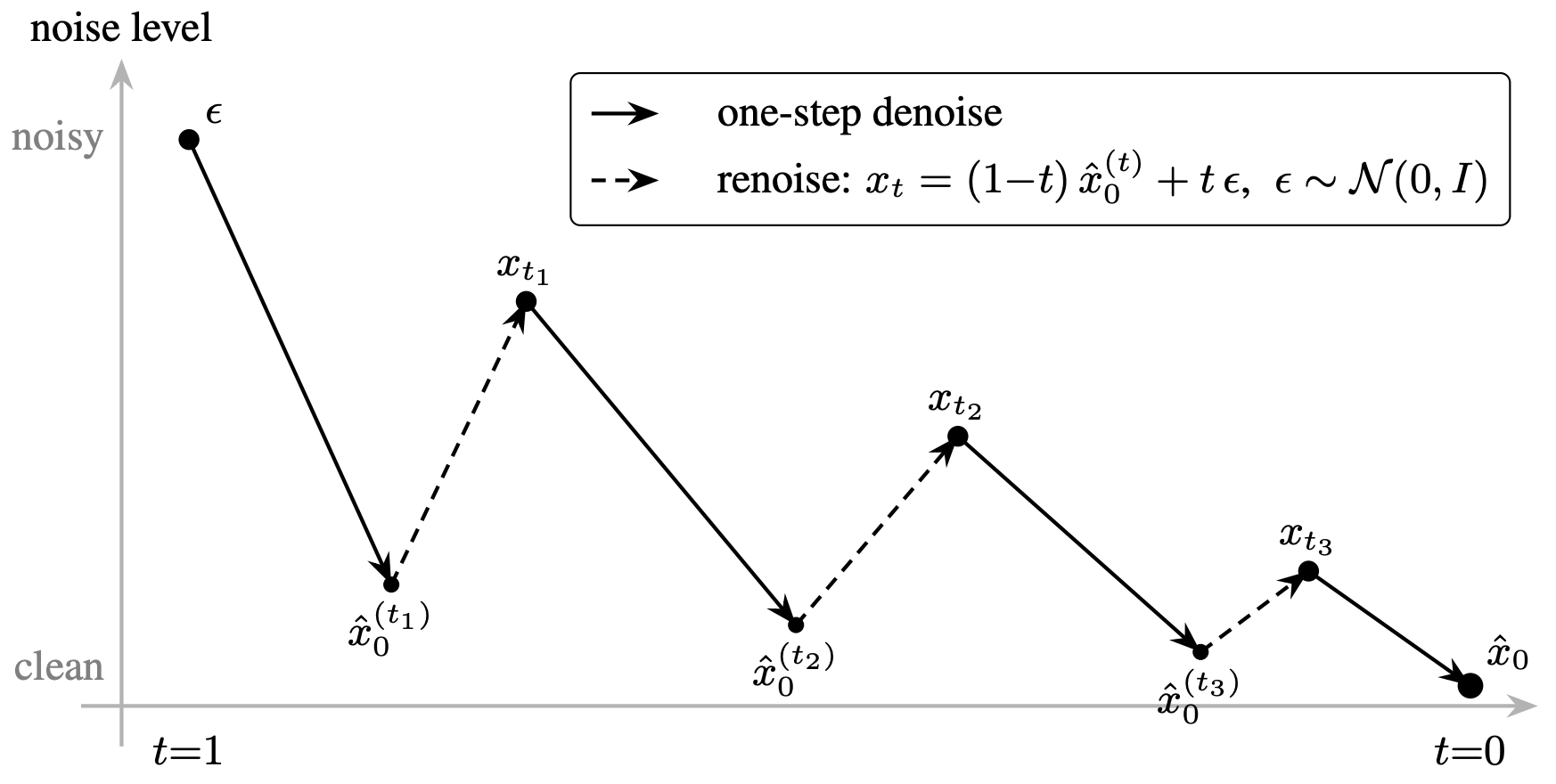
Even after distillation and adversarial post-training, going from pure noise to clean audio in one step is challenging.
So, at inference, ping-pong sampling is used: denoise, add a little noise back, denoise again, add less noise, denoise, done. Eight iterations total.
Runs on your laptop
small runs on a MacBook Pro M4. Takes 5.92 seconds to generate 120 seconds of audio. With CoreML acceleration, that drops to 3 seconds.
medium needs about 6.5 GB of VRAM at 120s. It fits on an RTX 4060, RTX 3060, or RTX 4070. It takes a few seconds to generate 6 minutes of audio.
If you’re building creative tools, you can now experiment with on-device AI audio features. With no API costs, no network latency, and built-in privacy.
If you’re a musician or sound designer, try inpainting. Iterate, edit, and regenerate parts to stay in control and execute your vision.
In the technical report and model repository, we provide further details:
Disclaimer. The views expressed are my own and do not reflect the opinions or positions of my employer.